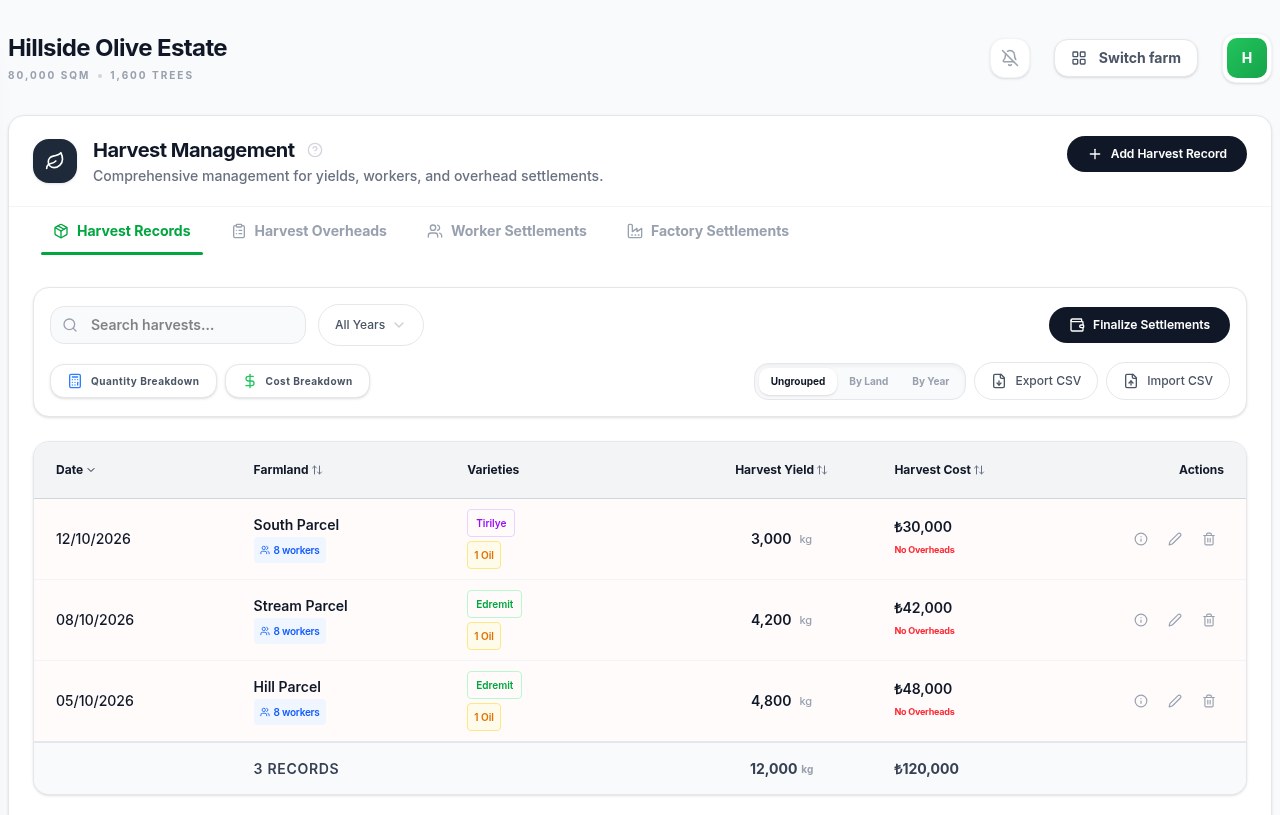
How do I record an olive harvest in Olive Farm?
Choose the parcel and date, enter weighed olives, and record the workers and costs belonging to that harvest.
Check Your Parcels
In Administration → Lands, confirm the parcel names and areas you will use. Keep one consistent record for each parcel so later work and harvests refer to the same place.
Confirm the Season
Check the harvest-year settings before entering the season’s work. Use the dates and season labels appropriate to your estate; use the same period when reviewing results.
Record Each Harvest
In Harvest → Add Harvest Record, select the date and parcel. Record the variety, weighed quantity and processing route. Use your weighbridge slip or field record as the reference.
Include the Work Behind It
Record the workers and additional harvest costs that belong to that entry. Keep grove maintenance in Maintenance and other harvest overheads in their own records so the same expense is not entered twice.
Check the Day’s Totals
Review the harvest table by date or parcel. Compare the quantities with your slips and check missing costs before moving to the next delivery.